The Problem – Modern USB-C Devices Lack Essential Ports
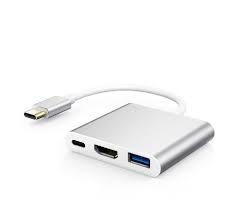
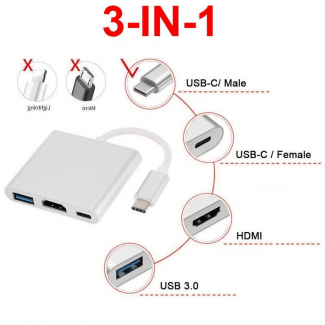
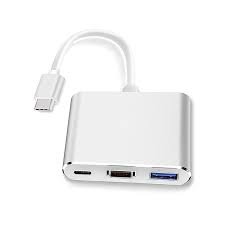
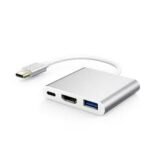
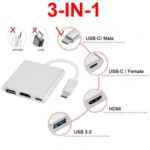
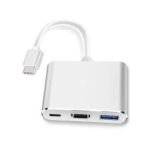
Sleek, modern laptops and tablets have abandoned traditional ports in favour of USB-C. For example, a MacBook or ultrabook may have only one or two USB-C ports. Similarly, an iPad Pro or Android tablet has a single USB-C port and nothing else. Furthermore, connecting to a projector or external monitor, charging your device, and using a USB drive simultaneously is impossible without an adapter. As a result, you are forced to carry multiple dongles or choose which function to use. This USB-C HDMI Multiport Adapter solves that problem. Consequently, you gain HDMI, USB-A, and charging passthrough from a single USB-C port.
HDMI Output – Connect to Any Display
The primary function of this adapter is video output. Specifically, it features an HDMI port that supports up to 4K resolution at 30Hz or 1080p at 60Hz. Therefore, you can connect your USB-C laptop, tablet, or phone to an external monitor, TV, or projector. For instance, present slides from your laptop to a conference room projector. Similarly, stream a movie from your tablet to a hotel TV. As a result, you get big-screen viewing without complicated setup.
The HDMI port supports video mirroring (same image on both screens) or extended desktop (different images on each screen), depending on your device and operating system. Consequently, you have flexibility for work or entertainment.
USB-A Port – Connect Traditional Peripherals
Many essential devices still use USB-A. This adapter includes a USB-A port. Specifically, it supports USB 2.0 or USB 3.0 speeds (typically up to 5Gbps for data transfer). Therefore, you can connect your mouse, keyboard, USB drive, or external hard drive. For instance, plug in a USB flash drive to transfer files to your tablet. Similarly, connect a wired mouse for precise control during a presentation. As a result, your USB-C device works with all your existing peripherals.
USB-C Charging Passthrough – Power While You Work
The most frustrating limitation of single-port devices is that you cannot charge while using other functions. This adapter solves that. Specifically, it features a USB-C port dedicated to Power Delivery (PD) charging passthrough. Therefore, you can plug your original USB-C charger into the adapter, and the adapter will power your laptop or tablet. For example, present for hours without your laptop battery dying. Similarly, stream video while keeping your device topped up. As a result, you never have to choose between connectivity and charging.
Note that the charging passthrough is typically up to 60W or 100W, depending on the adapter. This is sufficient for most laptops, ultrabooks, tablets, and phones.
Plug and Play – No Drivers or Software
Some adapters require driver installation. This one is different. It is truly plug and play. Specifically, simply connect the adapter to your device’s USB-C port. The HDMI, USB-A, and charging ports are immediately recognised. For example, on a Windows laptop, the external display appears automatically. On a Mac, you may need to adjust display settings. On an Android phone or iPad, video output may work depending on device support. As a result, setup takes seconds, not minutes.
Compact and Portable – Slips into Any Bag
This adapter is designed for travel and daily carry. Specifically, it is small enough to fit in a pocket, laptop bag, or pencil case. Therefore, you can take it everywhere. For instance, keep one in your work bag for office presentations. Similarly, take it on holiday to connect your tablet to hotel TVs. As a result, you are never caught without the right ports.
The build quality is durable, with an aluminium or reinforced plastic housing. Consequently, it withstands the rigours of daily use and travel.
Real Use Cases for UK Users
Consider a business professional who travels between client sites. Their lightweight laptop has only two USB-C ports. At a client’s office, they need to present slides on a projector (HDMI), use a USB drive to load files (USB-A), and keep their laptop charged (USB-C PD). This single adapter handles all three tasks. Accordingly, they walk into the meeting with a single, tidy connection. As a result, they look professional and prepared.
Similarly, a student uses an iPad Pro for note-taking and media consumption. They want to watch a lecture on a dorm room TV. The iPad has only one USB-C port. This adapter allows them to connect the iPad to the TV via HDMI while keeping the iPad charged. For instance, they plug the charger into the adapter’s PD port. Consequently, they enjoy the lecture on a big screen without battery anxiety.
Furthermore, a creative professional edits video on a MacBook. They need to view their work on a large external monitor (HDMI), transfer footage from a USB hard drive (USB-A), and keep the laptop charged (USB-C PD). This adapter provides all three connections from a single port. As a result, their desk setup is clean and functional.
Likewise, someone uses a USB-C phone that supports video output (such as Samsung DeX or Motorola Ready For). They can connect the phone to a TV or monitor via HDMI, use a USB keyboard and mouse, and charge simultaneously. Consequently, their phone becomes a desktop computer.
Device Compatibility – What Works with This Adapter?
This adapter works with any USB-C device that supports video output over USB-C (DisplayPort Alt Mode) and Power Delivery. Specifically:
Laptops:
-
MacBook Pro/Air (USB-C models)
-
Dell XPS, HP Spectre, Lenovo Yoga
-
Microsoft Surface Laptop (USB-C models)
-
Google Pixelbook and Chromebooks
Tablets:
-
iPad Pro and iPad Air (USB-C models) – supports video output
-
Samsung Galaxy Tab S series – supports video output
-
Other Android tablets (check manufacturer support)
Smartphones:
-
Samsung Galaxy S8 to S24 (DeX mode) – supports video output
-
Samsung Galaxy Note series – supports video output
-
Some Huawei, Motorola, and LG phones – check specifications
-
iPhones with USB-C (iPhone 15/16) – support video output
For example, a Samsung S23 user can connect to a TV to watch videos or use DeX desktop mode. Similarly, a MacBook user can extend their display to a monitor. As a result, check your device’s specifications if video output is essential.
What Does NOT Work?
Not all USB-C devices support video output. For example, many Android phones (Pixel, OnePlus, Xiaomi) do NOT support HDMI output over USB-C. Similarly, the Nintendo Switch requires a proprietary dock for video output. Therefore, if your device does not support DisplayPort Alt Mode, the HDMI port will not work. As a result, check your device’s specifications before purchasing.
Important Note – USB-C Port Is for Charging Only
The USB-C port on this adapter is for Power Delivery (PD) charging only. It does NOT support data transfer or video output. Therefore, you cannot use it to connect a USB-C flash drive or another monitor. For data, use the USB-A port. For video, use the HDMI port. As a result, understand the limitations of each port.
This 3-in-1 USB-C to HDMI multiport adapter is supplied by Sellertree, a UK-based online seller of practical tech and connectivity essentials.
BULLET POINTS
✅ HDMI output – supports up to 4K@30Hz or 1080p@60Hz for external displays
✅ USB-A port – connect mouse, keyboard, USB drive, or external hard drive
✅ USB-C charging passthrough – power your device while using HDMI and USB-A
✅ Plug and play – no drivers or software required, instant recognition
✅ Compact and portable – small size fits in any laptop bag or pocket
✅ Universal compatibility – works with MacBook, iPad Pro, Samsung DeX, and more
✅ Aluminium housing – durable and heat-dissipating for reliable performance
✅ Essential for modern laptops – restores ports that manufacturers removed
SPECIFICATIONS TABLE ABOUT USB-C HDMI Multiport Adapter
HOW TO USE THIS USB-C HDMI Multiport Adapter
-
Plug the adapter’s USB-C connector into your laptop, tablet, or phone.
-
Connect an HDMI cable from the adapter to your TV, monitor, or projector.
-
Connect your USB-A device (mouse, keyboard, flash drive) to the USB-A port.
-
Plug your USB-C charger into the USB-C PD port to charge your device while using the adapter.
-
Your external display should be detected automatically (adjust settings in your OS if needed).
-
For extended desktop on Windows/Mac, go to display settings.
-
To disconnect, unplug the adapter from your device.





 Overview
 Processor
 Display
 RAM
RAM
 Storage
 Video Card
 Connectivity
 Features
 Battery
 General



















Reviews
Clear filtersThere are no reviews yet.