The Problem – One HDMI Port Cannot Feed Two Screens
1 in 2 Out – Mirror Your Source to Two Displays (hdmi splitter cable)
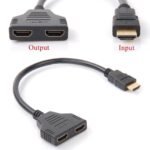
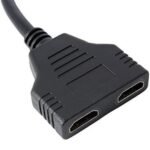
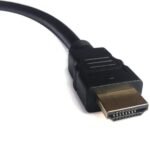
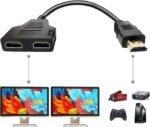
This cable features one male HDMI plug for input and two female HDMI ports for output. Specifically, connect your source device (laptop, Sky Box, Fire Stick, games console) to the male end. Connect two displays (TVs, monitors, projectors) to the female ends. Therefore, the same image appears on both screens at the same time. For instance, show a presentation on two monitors in a conference room. Similarly, watch a movie on two TVs in a home cinema setup. As a result, everyone sees the same content.
The cable duplicates the signal. Consequently, it does not extend your desktop (see note below).
Supports 1080P Full HD – High Quality Resolution (hdmi splitter cable)
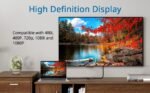
This splitter cable supports Full HD 1080P resolution. Specifically, it handles 1920×1080 pixel resolution at standard refresh rates. Therefore, your HD content looks sharp and detailed. For instance, watch Blu-ray movies or play console games on two screens simultaneously. Similarly, display high-resolution presentations without loss of quality. As a result, you get the best possible picture from your 1080P source.
The cable also supports lower resolutions like 720P and 480P. Consequently, it is backwards compatible with older equipment.
12 Inch Length – Compact and Tangle-Free
The cable is 12 inches (approximately 30cm) long. Specifically, it is short enough to sit neatly behind your TV or media cabinet. Therefore, it does not create cable clutter. For instance, plug it directly into the back of your source device. Connect two standard HDMI cables to the female ports. As a result, the splitter itself is hidden from view.
The short length also reduces signal loss. Consequently, you get a cleaner, more reliable connection.
Important Note – Mirroring Only, Not Extended Desktop
This splitter cable duplicates the same image on both screens. Specifically, it does NOT extend your desktop across two monitors. Therefore, you cannot have different content on each screen. For instance, you cannot have email on one monitor and a spreadsheet on the other. As a result, this splitter is for mirroring only, not for expanding your workspace.
For extended desktop functionality, use a USB graphics adapter or a different type of splitter. Consequently, choose the right tool for your needs.
Passive Design – No External Power Required (hdmi splitter cable)
Some HDMI splitters need USB power. This cable is passive. Specifically, it draws power directly from the HDMI source. Therefore, no extra cables or wall sockets are required. For instance, plug it into your laptop’s HDMI port. The laptop provides enough power to drive two displays (depending on the devices). As a result, setup is cleaner and simpler.
Note: Some source devices may not provide enough power for two displays. Consequently, if you experience flickering or no signal, you may need a powered splitter.
Plug and Play – No Drivers or Software Required
This splitter cable is truly plug and play. Specifically, no drivers, no software, and no configuration. Therefore, you simply connect the cables. For instance, plug the male end into your source. Plug your display cables into the female ends. As a result, both screens light up with the same image immediately.
The cable works with Windows, Mac, Linux, Chrome OS, and all HDMI source devices. Consequently, no operating system restrictions.
Real Use Cases for UK Homes and Offices
Consider a teacher in a classroom who wants to show a lesson on both the interactive whiteboard and a small monitor at their desk. The desktop computer has only one HDMI port. This splitter cable solves the problem. Plug the cable into the computer’s HDMI port. Connect the whiteboard to one female port. Connect the monitor to the other. As a result, the teacher sees the same content on both screens and can control the lesson from their desk.
Similarly, a home gym owner has a TV on the wall and a small monitor on a treadmill. They want to watch the same YouTube workout video from either location. They connect their Fire Stick to the splitter cable’s male end. The wall TV and treadmill monitor connect to the female ends. As a result, they can move between equipment without losing their place in the video.
Furthermore, a pub shows live sports on two large TVs in different areas of the bar. The Sky Box has only one HDMI output. This splitter cable sends the signal to both TVs simultaneously. For instance, the bartender can set the channel once, and both TVs display the match. As a result, all customers have a good view, and the pub avoids complex cabling.
Supports HD, LED, and LCD TVs (hdmi splitter cable)
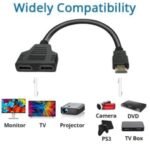
This splitter cable is compatible with all modern display types. Specifically, it works with:
For example, connect it to a 1080P LED TV and a 720P projector. The cable handles both. As a result, it is versatile for different setups.
Compact Design – Fits in Tight Spaces
The 12-inch length is ideal for tight spaces. Specifically, it fits easily behind wall-mounted TVs, in media cabinets, or under desks. Therefore, you can hide it out of sight. For instance, plug it directly into the back of a TV that is flush against the wall. The short cable does not push the TV forward. As a result, your installation remains neat and professional.
The black colour blends with most equipment. Consequently, it is not an eyesore.
Easy Setup – Step by Step (hdmi splitter cable)
Setting up this splitter cable takes seconds. First, plug the male HDMI end into your source device (laptop, Sky Box, Fire Stick, games console). Second, connect your first display to one of the female HDMI ports using a standard HDMI cable. Third, connect your second display to the other female HDMI port using another standard HDMI cable. Fourth, turn on your source device and displays. The same image should appear on both screens. As a result, you are ready to go.
If one screen is blank, check that both displays support the output resolution. Consequently, set your source to 1080P or lower.
Important – Passive Splitter Limitations
Because this splitter is passive (no external power), it has some limitations. Specifically, it works best with strong HDMI signals from laptops, desktop computers, and powered source devices. For instance, a laptop typically provides enough power. However, some devices like Fire Sticks or Chromecasts may not provide sufficient power for two displays. As a result, you may experience flickering or no signal.
If you experience issues, try a powered HDMI splitter. Consequently, choose the right tool for your source device.
Supports Audio – Sound Passes Through
This splitter cable carries both video and audio. Specifically, the audio signal from your source is passed through to both displays. Therefore, you get sound on both screens. For instance, if your TV has speakers, the sound will play. Similarly, if your monitor has built-in speakers, you will hear audio. As a result, no separate audio cables are needed.
If one display does not have speakers, the audio is simply not used. Consequently, no harm done.
No Signal Degradation – High Quality Construction
Cheap splitter cables can degrade the signal. This cable is built with quality materials. Specifically, it uses 24K gold-plated connectors and shielded wiring. Therefore, the signal remains strong and clean. For instance, no static, snow, or dropouts. Similarly, the image stays sharp without ghosting. As a result, you get reliable performance.
The connectors are corrosion-resistant. Consequently, they last longer than standard connectors.
Great for Presentations and Events
Business presenters often need to show slides on multiple screens. For example, a conference room may have a large wall screen and a smaller confidence monitor for the speaker. This splitter cable connects both to the same laptop. As a result, the speaker sees what the audience sees. Similarly, trade show booths can show promotional videos on two screens from one media player. As a result, you save on equipment costs.
The compact size makes it easy to pack. Consequently, take it to off-site meetings.
Not for 4K – 1080P Maximum (hdmi splitter cable)
This splitter cable supports up to 1080P resolution. Specifically, it does NOT support 4K. Therefore, for 4K sources, you need a 4K-rated splitter. For instance, a PlayStation 5 or Xbox Series X outputting 4K will not work properly with this cable. As a result, use this only for 1080P and lower resolutions.
If you have a 4K TV, the cable will downscale the signal to 1080P. Consequently, you lose the 4K benefit.
Affordable Solution – No Need for Expensive Switches
Active HDMI splitters with power cost more. This passive splitter cable is affordable. Specifically, it provides basic mirroring functionality at a low price. Therefore, it is perfect for simple setups where power is limited. For instance, for a classroom or home gym. As a result, you save money for other equipment.
The 12-inch length is included. Consequently, no need to buy separate short cables.
This HDMI splitter cable 12 inch 1080P HDMI cable male to dual HDMI female is supplied by Sellertree, a UK-based online seller of practical connectivity and AV essentials.
BULLET POINTS
✅ 1 in 2 out – mirror one source to two displays simultaneously
✅ Supports 1080P Full HD – high quality resolution for HD content
✅ 12 inch length – compact, tangle-free, fits behind TVs
✅ Male to dual female – connects directly to source device
✅ Passive design – no external power required (in most cases)
✅ Plug and play – no drivers, no software, no configuration
✅ Gold-plated connectors – corrosion-resistant, reliable signal
✅ Important note – for mirroring only, not extended desktop
SPECIFICATIONS TABLE (hdmi splitter cable)
HOW TO USE (hdmi splitter cable)
-
Plug the male HDMI end of the splitter cable into your source device (laptop, Sky Box, Fire Stick, games console).
-
Connect your first display (TV, monitor, projector) to one of the female HDMI ports using a standard HDMI cable.
-
Connect your second display to the other female HDMI port using another standard HDMI cable.
-
Turn on your source device and displays.
-
The same image should appear on both screens.
-
If one screen is blank, ensure your source is set to 1080P or lower resolution.
-
For passive splitters, if you experience flickering, your source may not provide enough power (consider a powered splitter).






 Overview
 Processor
 Display
 RAM
RAM
 Storage
 Video Card
 Connectivity
 Features
 Battery
 General

















Reviews
Clear filtersThere are no reviews yet.